
TOOLTOP ET14C Review detail
When you are checking a hot breaker, tracing a water leak behind drywall, or looking for an overheating component on a PCB, a handheld thermal imaging camera can save a lot of guesswork. The TOOLTOP ET14C is positioned as a cheap thermal camera for home inspections, electronics work, and fault finding. On paper, this thermal imager offers stronger value than a basic infrared camera, but the real question is whether its price matches its real-world usefulness
This review is based on the current product listing, visible store specs, and comparison research against better-known thermal camera competitors.

What is this product?
TOOLTOP ET14C Review
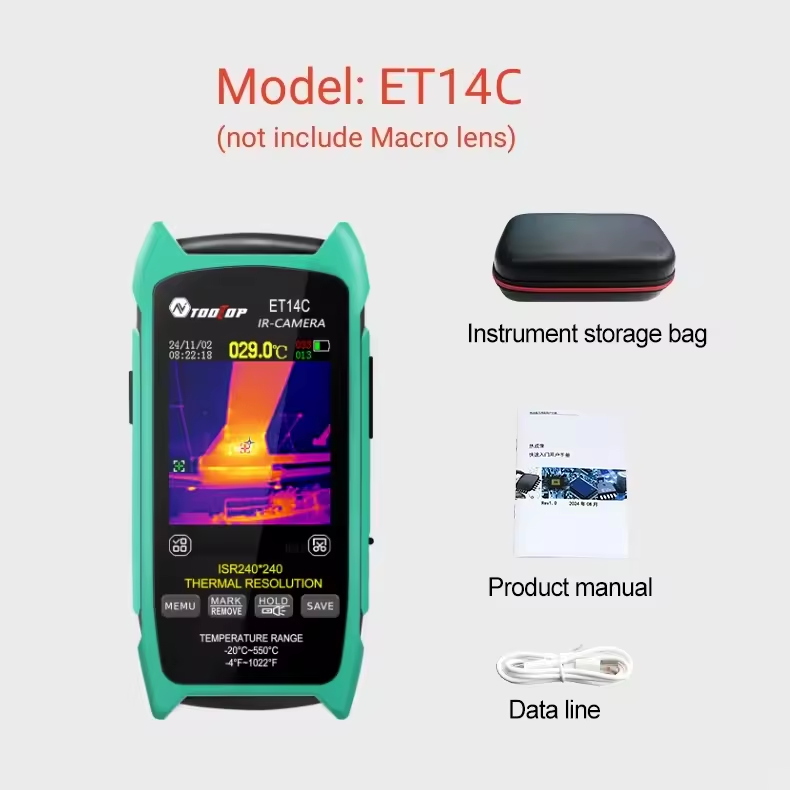
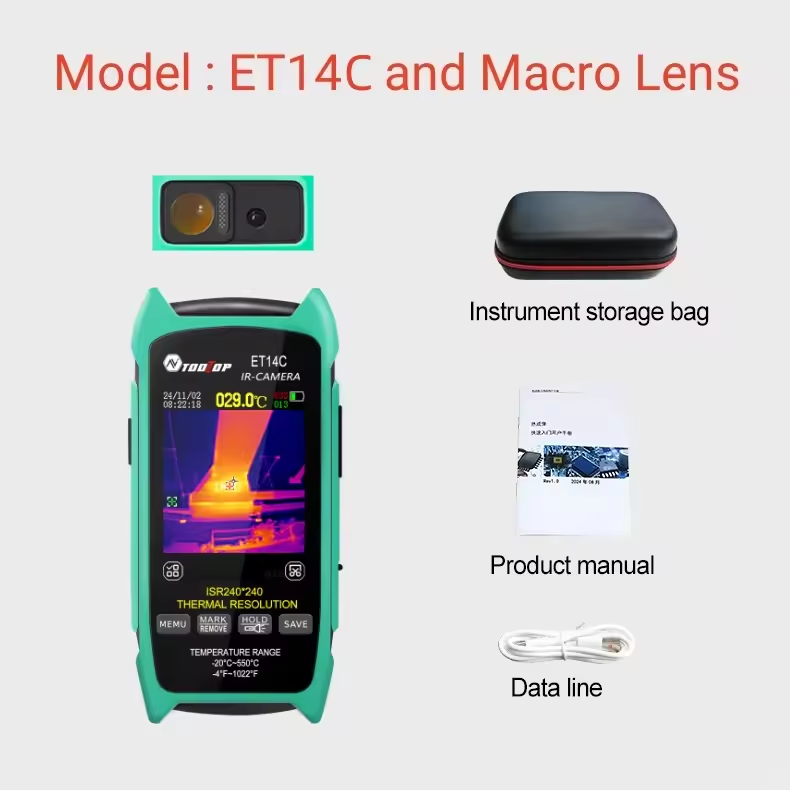
The TOOLTOP ET14C is a standalone handheld thermal imaging camera, also called a thermal imager or infrared camera, designed to show heat patterns on electrical parts, appliances, walls, pipes, and circuit boards. Unlike a phone thermal camera, it has its own 2.8-inch screen, a removable 18650 battery, onboard image capture, and optional macro-lens support for close-up PCB inspection
Key Features
TOOLTOP ET14C Review
- ✅ 240 x 240 thermal imaging resolution
- ✅ 25Hz image capture frequency for smoother scanning
- ✅ 2.8-inch built-in display
- ✅ Temperature range from -20°C to 550°C
- ✅ Adjustable emissivity from 0.1 to 0.99
- ✅ Five color palettes including Iron Red, Rainbow, Fusion, White Heat, and Red Heat
- ✅ Optional macro lens for PCB and electronics work
- ✅ PC software analysis through USB mode
- ✅ Removable 18650 lithium-ion battery
- ✅ Claimed runtime of up to 8 hours
- ✅ Built-in photo capture and image review


Current Price
TOOLTOP ET14C Review
The clearest current price visible in the supplied store screenshot is $174.68 as a welcome deal. That places the TOOLTOP ET14C in the budget-to-lower-midrange thermal imaging camera category, above toy-level infrared camera gadgets but below premium brands like FLIR.
Real Pros and Cons
TOOLTOP ET14C Review
| Pros | Cons |
| ✅ Good resolution for the money at 240 x 240 | ✅ Brand trust is weaker than FLIR, TOPDON, or Seek Thermal |
| ✅ Standalone design means no need for an iPhone or Android phone | ✅ Seller notes mention periodic calibration every 10 seconds, with a possible 1 to 2 second lag |
| ✅ Removable 18650 battery is better for long jobs than sealed battery designs | ✅ Storage is limited at 7.5MB |
| ✅ Optional macro lens makes it more useful for PCB inspection and electronics troubleshooting | ✅ No clear IP rating or ruggedness claim was visible in the sources I checked |
| ✅ 25Hz refresh rate should feel smoother than slower budget thermal imagers | ✅ PC software exists, but lesser-known brands often have rougher software support than premium competitors |
| ✅ Useful temperature range for home maintenance, appliance checks, electrical work, and general thermal imaging camera use | ✅ If you mainly want an iPhone or Android phone thermal camera, a phone attachment may be more convenient |
| These points make the ET14C appealing if you want a practical thermal imager without paying premium phone-attachment prices. | These are real drawbacks, and they matter. The ET14C looks strong on value, but it does not completely remove the usual budget thermal camera trade-offs. |
Comparison
TOOLTOP ET14C Review
Here is a practical value comparison between the TOOLTOP ET14C and the higher-priced TOPDON TC002 , which is a better-known phone thermal camera for iOS users.
| Feature | TOOLTOP ET14C | TOPDON TC002 |
| Product type | Standalone handheld thermal imaging camera | iOS phone thermal camera attachment |
| Current price found | $174.68 | $229.00 |
| Native IR resolution | 240 x 240 | 256 x 192 |
| Built-in screen | Yes, 2.8-inch | No, uses phone screen |
| Battery setup | Removable 18650 battery | Powered through iPhone or iPad workflow |
| Main strength | Main strengthSelf-contained, good for field use and bench work | Compact, app-based, easy for iPhone users |
| Main weakness | Less proven brand and software ecosystem | Needs compatible iOS device and costs more |
| Best buyer | Users who want a handheld thermal imager | Users who specifically want a phone thermal camera |
On pure value, the TOOLTOP ET14C is easier to justify if you want a cheap thermal camera with its own screen and battery. The TOPDON TC002 makes more sense if you already prefer an iPhone-based workflow and want a more established brand.
Who should buy this
TOOLTOP ET14C Review
- ✅ Homeowners checking hot outlets, panels, windows, insulation gaps, and possible water leak areas
- ✅ DIY users who want a cheap thermal camera that is still serious enough for regular use
- ✅ Electronics hobbyists who need a thermal imaging camera for PCB inspection
- ✅ Technicians who prefer a standalone thermal imager instead of a phone thermal camera
- ✅ Buyers who want better value than premium-brand handheld infrared camera options
Who should not buy this
TOOLTOP ET14C Review
- ✅ Buyers who want premium app support, warranty confidence, and brand reputation
- ✅ People who mainly want the best thermal imaging camera for iPhone or a thermal camera for Android phone use
- ✅ Users who need industrial-grade ruggedness or a clearly stated IP rating
- ✅ Anyone who needs large onboard storage or a polished reporting ecosystem
That is really the core buying decision: the ET14C is strongest as a value-first handheld thermal imaging camera, not as a prestige-brand tool.
How to Use the TOOLTOP ET14C Correctly
TOOLTOP ET14C Review
Charge or install the 18650 battery before your first job.
Power on the thermal imager and let it stabilize for a moment.
Choose the right color palette for the task. White Heat or Fusion can be easier for quick fault spotting, while Rainbow can help show temperature spread.
Set emissivity correctly when measuring different surfaces. This matters if you want more reliable readings.
Expect periodic calibration pauses, because the seller notes say the unit recalibrates regularly.
For normal wall, appliance, or electrical inspection, use the standard lens mode.
For PCB inspection or very close electronics work, use the optional macro lens and stay near the recommended close working distance.
Sweep slowly across the target rather than moving too fast. That helps you catch smaller hot spots.
Save photos of hot spots so you can compare before and after repairs.
If you need deeper review or reporting, transfer images to a PC using USB mode and use the PC software.
That workflow is why this product is more useful than a novelty infrared camera and closer to a real entry-level thermal imaging camera for troubleshooting.
Buying Guide
TOOLTOP ET14C Review
If you are comparing this thermal imaging camera with other options, focus on these points before buying:
- ✅ Resolution
- A cheap thermal camera can look impressive in ads, but the real value comes from usable resolution. The ET14C’s 240 x 240 is one of its biggest strengths for the price.
- ✅ Handheld vs phone thermal camera
- If you want a self-contained tool, the ET14C makes more sense. If you want a lighter, pocketable option for iPhone use, something like the TOPDON TC002 may suit you better.
- ✅ Close-up electronics use
- If your main goal is PCB inspection, the optional macro lens matters a lot. Not every budget infrared camera handles close-range board work well
- ✅ Software and long-term support
- This is where premium brands usually win. Better-known brands often have stronger apps, documentation, updates, and resale confidence.
- ✅ Your main use case
- For home maintenance, electrical fault detection, appliance checks, and thermal imaging camera for water leak detection, the ET14C looks like good value. For a phone-first workflow, it is not the most natural choice.
FAQs
TOOLTOP ET14C Review
- Is the TOOLTOP ET14C a good cheap thermal camera?
- Yes, it looks like a strong cheap thermal camera if your goal is to get a standalone handheld thermal imager with decent resolution, a removable battery, and macro-lens support without moving into premium-brand pricing. The value case is especially good for home use and electronics troubleshooting
- Is it better than a phone thermal camera?
- It depends on your workflow. The ET14C is better if you want a dedicated thermal imaging camera that works on its own. A phone thermal camera is better if you want maximum portability and already like working through your iPhone or Android display.
- Is the TOOLTOP ET14C good for PCB inspection?
- Yes, this is one of the most interesting use cases for the ET14C because the seller specifically recommends the macro-lens version for PCB circuit board inspection. That makes it more relevant for electronics work than many generic infrared camera listings.
- Is a thermal imager the same as an infrared camera?
- In buyer searches, the terms thermal imager, thermal imaging camera, and infrared camera are often used almost interchangeably. In practice, people usually mean a device that visualizes heat patterns for inspection work. What matters more is whether the product is a real thermal imaging camera with useful resolution and measurement features, not just a generic infrared gadget
Final Verdict
TOOLTOP ET14C Review
The TOOLTOP ET14C looks worth it for buyers who want a budget handheld thermal imaging camera with real troubleshooting potential. Its strongest points are the 240 x 240 resolution, 25Hz refresh rate, removable battery, built-in screen, and optional macro lens for PCB inspection. Its weaker points are the less-established brand, light storage, calibration lag, and likely weaker software ecosystem compared with TOPDON, Seek, or FLIR.
If you want a practical cheap thermal camera for home repair, electronics, and general fault-finding, the ET14C is easy to shortlist. If you want the most polished phone thermal camera experience for iPhone, spending more on a better-known competitor may still be the smarter move.
Recommended For You 🔗
Oilsky HiFi MP3 Player Review: $89 Hidden Audiophile Gem?
